
What's in a priced bill of quantities
Updated 13 November 2026
A priced bill of quantities (BOQ) lists every item in a job with its quantity, rate and total. Ours comes in Excel, and every line shows the drawing it was measured from. Your estimator also marks up the plans in PDF, so every quantity is drawn on the drawing it came off.
This guide shows what goes into a BOQ, the units it is measured in, how it differs from a schedule of rates, who uses one, and what we send you when we price your job.
What is in a bill of quantities?
A BOQ breaks a job down into lines a builder can price and check. It is grouped by trade, so the concrete sits together, then the framing, then the roof, and each trade has a subtotal. Every line carries the same few things:
- The trade it belongs to, such as Concrete & formwork or Painting.
- The item, described well enough that two people would price the same thing.
- The unit it is measured in.
- The quantity, measured off the plans.
- The rate for one unit, built up from labour, plant and materials.
- The total, which is the quantity times the rate.
The trade totals add up to the job total. That is the number you put your margin on. Where the drawings leave something open, the BOQ says what was assumed, so you can see which numbers are firm and which ones still need an answer.
| Trade | Item | Unit | Qty | Rate | Total |
|---|---|---|---|---|---|
| Earthworks & civil | Bulk excavation to slab level | m³ | 45 | per m³ | Qty × rate |
| Concrete & formwork | Slab edge formwork | m | 64 | per m | Qty × rate |
| Concrete & formwork | Slab on ground | m² | 180 | per m² | Qty × rate |
| Carpentry & joinery | Internal hinged door, supply and fit | each | 9 | per each | Qty × rate |
| Painting | Ceilings, two coats | m² | 160 | per m² | Qty × rate |
| Preliminaries | Site setup and toilet hire | item | 1 | per item | Qty × rate |
What units does a BOQ use?
Each item is measured in the unit it is bought and built in. Most BOQs use five:
- m, linear metres.
- Things with a length: edge formwork, skirting, gutters, pipe runs, balustrades.
- m², square metres.
- Things with an area: slabs, wall linings, tiling, roofing, painted surfaces, insulation.
- m³, cubic metres.
- Things with a volume: excavation, fill and concrete.
- each, a count.
- Things you count one by one: doors, windows, piles, light fittings, basins.
- item, a lump sum.
- Things priced as a whole: site setup, cleaning at handover, a provisional sum for specialist work.
Real jobs show why the unit matters. On one seniors housing BOQ the builder asked us to confirm that 2,224 m² of R4 ceiling batts applied to Level 1 only, and to leave out patios and balconies because they have no ceilings. On another, a double-brick retaining wall measured at 288 m² became 14,688 bricks at the builder's own allowance of 51 bricks per square metre. Read the Newbuild Developments case study for both.
A page from a real BOQ
Priced bill of quantities. Every line shows the quantity, the rate, and the drawing it was measured from.
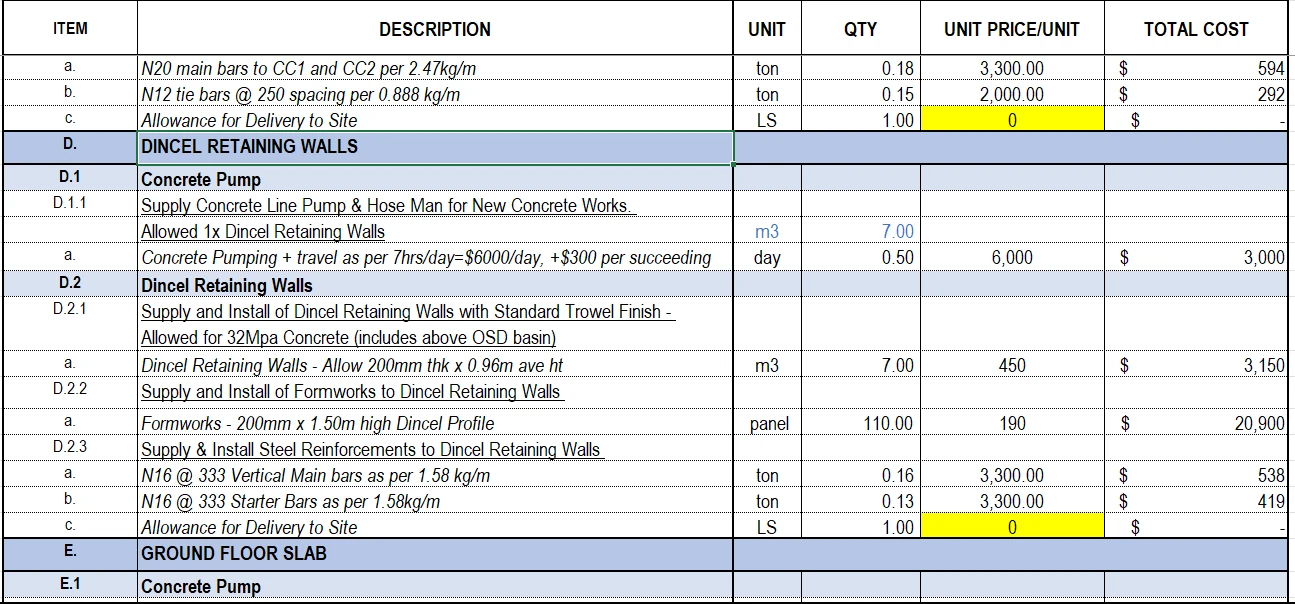
From a real job, with the client's details taken out.
The marked-up plans
Marked-up plans. Your estimator marks them, not you.
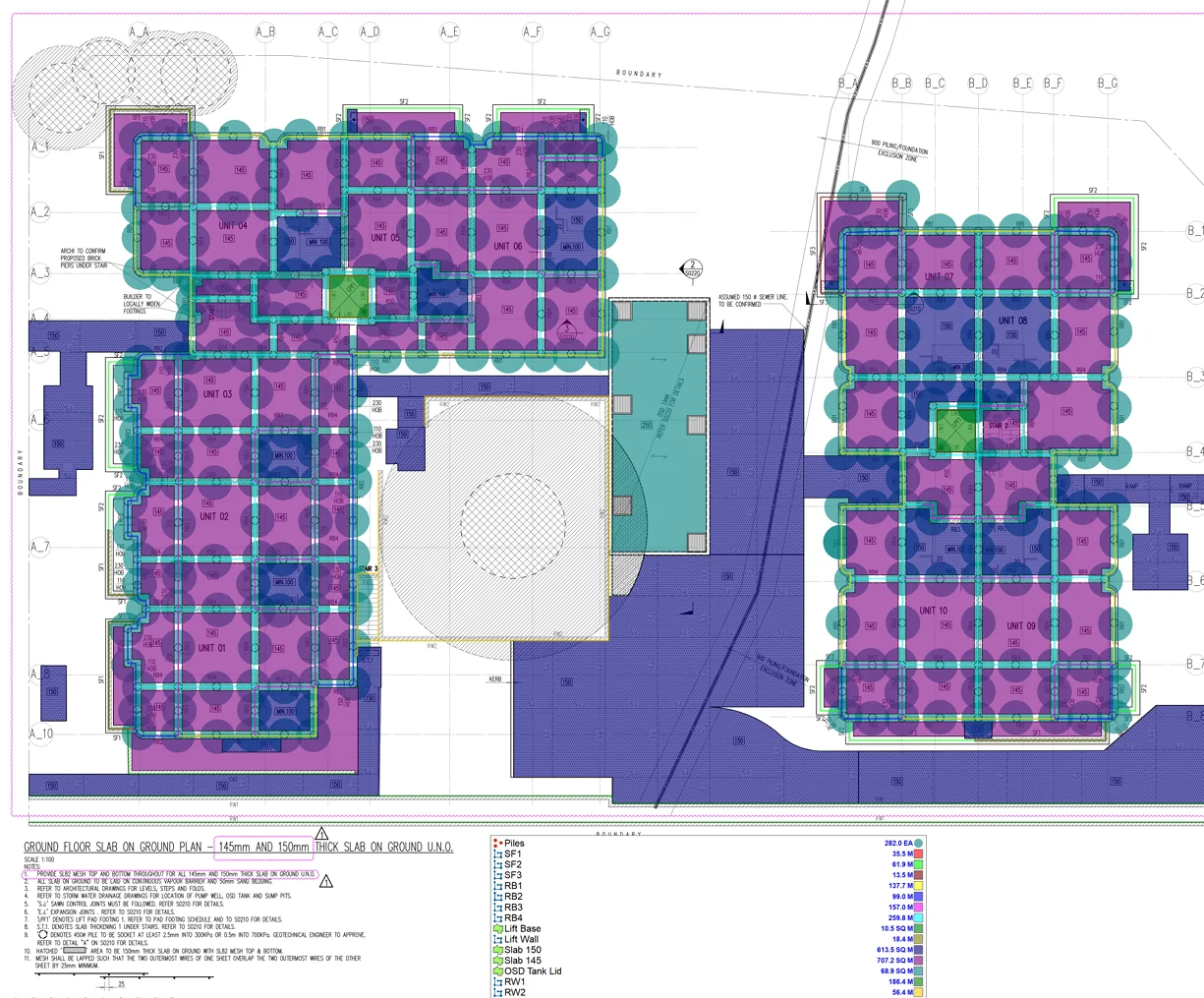
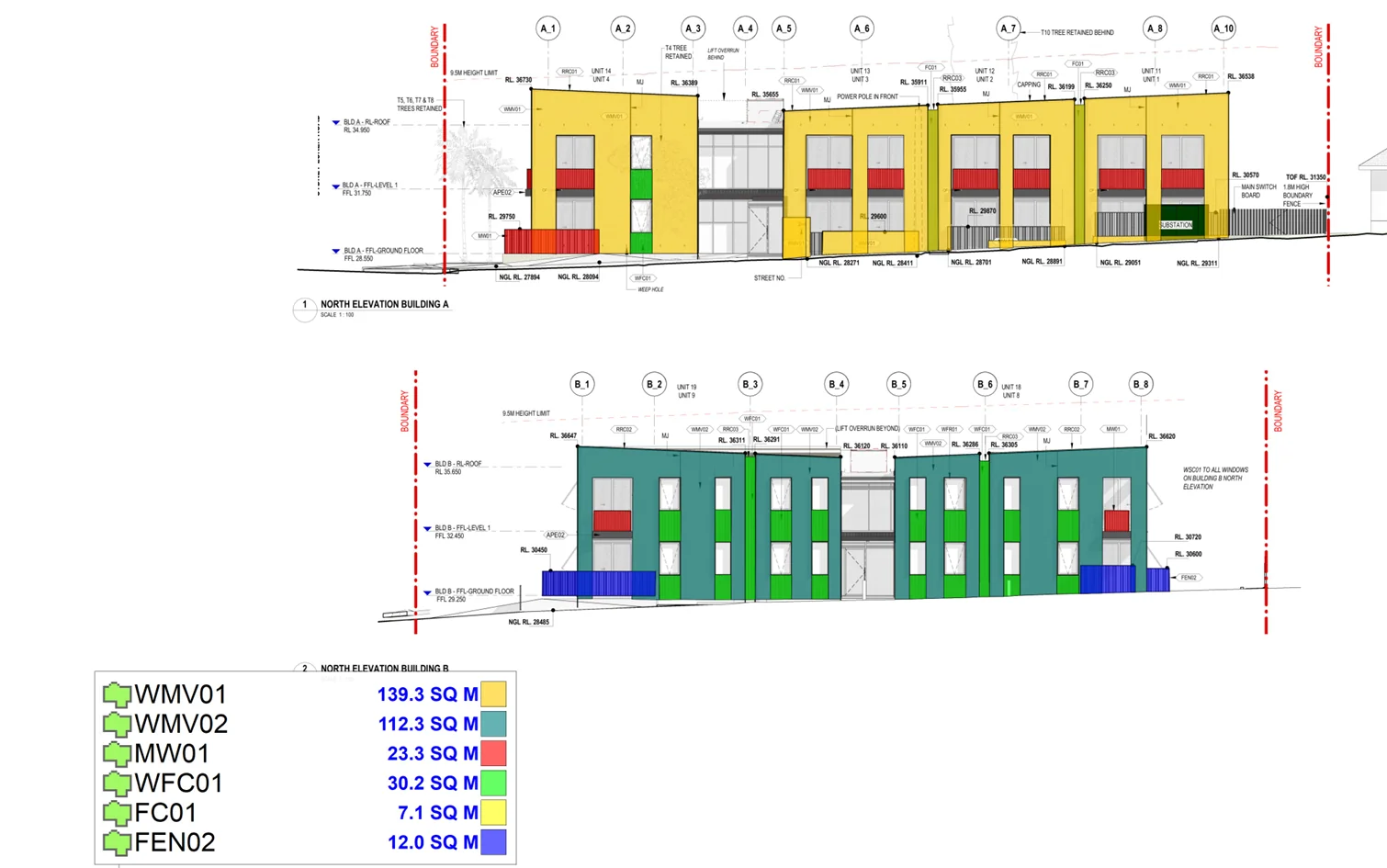
How is a BOQ different from a schedule of rates?
A BOQ measures the job first and then prices it, so you end up with a quantity, a rate and a total for every line, and a job total you can quote from. A schedule of rates lists the rate for each unit of work but not how many units there are, because the quantities are not known yet or will be measured as the work is done. A schedule of rates tells you what a square metre of tiling costs. A BOQ tells you what the tiling on this job costs. To put a fixed price on a tender, you need the BOQ.
Who uses a bill of quantities?
- Builders use it to price a tender or a quote, add their margin, and send each trade's lines to subbies for prices.
- Subcontractors use the lines for their own trade to price their package, or to check the quantities a builder has sent them. One painting contractor compared our markup with the BOQ a builder sent them and found it pretty close overall. See the Rusty's Painting case study.
- Quantity surveyors prepare and check BOQs, and use them for cost reports and progress claims.
The lists that come with it
-
Exclusions & RFIs
See what sits outside the price and what needs an answer.
-
Tender registers
Track returnables and missing documents for tender scopes.
Where the rates come from
We build our rates up from labour, plant and materials, then check them against current supplier and subbie prices in your state. Every rate on the BOQ shows how it was worked out. If you have your own rates, we use yours.
Every trade, on one BOQ
- Preliminaries
- Demolition
- Earthworks & civil
- Piling & footings
- Concrete & formwork
- Structural steel
- Blockwork & masonry
- Roofing & cladding
- Carpentry & joinery
- Partitions & fit-out
- Waterproofing
- Tiling & floors
- Painting
- Hydraulics
- Mechanical
- Electrical
- Fire services
- External works
- Fire proofing
What does Constructline send?
Every job comes back with an Excel BOQ and marked-up PDF plans. The BOQ is yours to edit: change a rate, add your margin, or cut it into packages for your subbies. The plans show where every quantity came from, so you can check any line against the drawing. Larger jobs add the exclusions list and the RFI list, and tenders add the returnables checklist and the missing documents list.
Wrong quantity? We fix it free. Addenda repriced at no extra cost. The files arrive by email and in your client login, most jobs within two working days after your go-ahead.
To see what it costs, read what a construction estimate costs. For more answers, see our guides and case studies.